

Early version, being tested on the UJP test environment
E-invoicing to UJP without the headache.
eFakt is a desktop app for the UJP electronic invoicing system. It runs on Windows, macOS and Linux, signs with your certificate and keeps outgoing and incoming documents in one place.
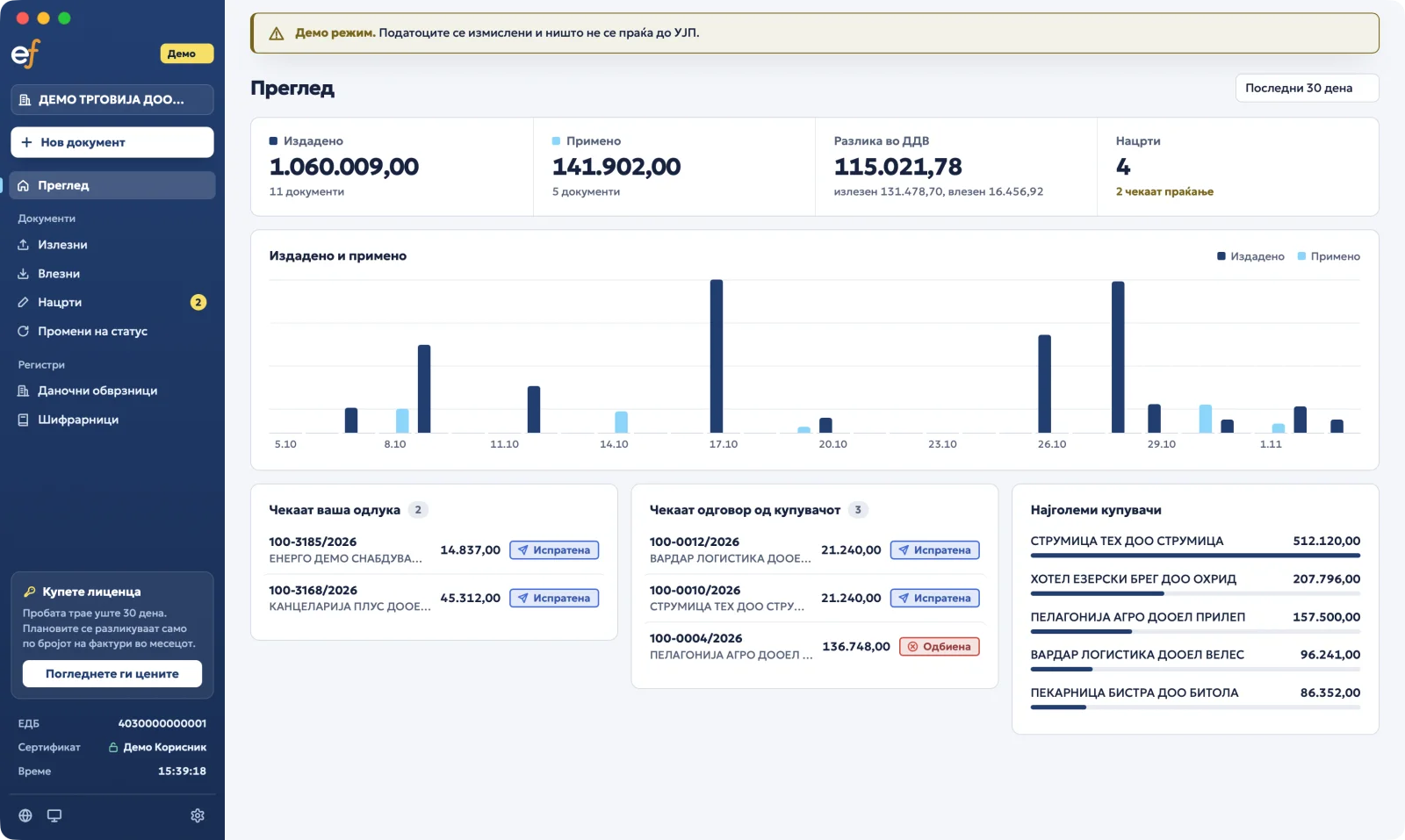
Everything at a glance
What you issued and received, the VAT difference, what is waiting for your decision and which buyer has not answered yet.
The whole life of a document, in one app
Outgoing invoices
- Issue
Enter the items. The app calculates VAT and totals using the UJP code lists.
- Sign
The document is signed on your computer, with your qualified certificate.
- Send
The invoice goes straight to UJP. You get an EUID, a status and a QR link.
- Cancel or correct
A sent invoice can't be deleted. The app prepares a cancellation or correction that references the original.
Incoming invoices
- Receive
See the invoices other companies have sent you, with the PDF and the original signed document.
- Accept or reject
A rejection carries a reason from the UJP code list and your comment.
- Allocate input VAT
Enter the taxable base and VAT per indicator, for your right to deduct.
Also: taxpayer lookup by EDB, NBRM exchange rates, every code list, status history, and PDF and ASiC downloads.
What you need before your first invoice
The app uses the same details as the UJP portal.
- Your company's EDB (tax number).
- Access to the UJP e-Faktura system and your eUJP identifier.
- A qualified e-signature certificate: a .p12 file, a USB token or a smart card.
No certificate yet? You can look up taxpayers and code lists without one.
Your signing key stays with you
Signing happens locally. The private key never leaves your computer or token, and the PIN isn't stored: it lives in memory only while the app is open.
- .p12 or .pfx fileA certificate stored as a file, protected by a password.
- USB token or smart cardVia PKCS#11. The key never leaves the card; the card signs by itself.
- macOS KeychainA certificate already imported into the system. macOS keeps the key.
Your data stays with you
eFakt is an application on your computer, not a web service. Without add-ons, your invoices, certificate and PIN never pass through us.
We have no access to your invoices, customers, certificates or passwords.
- No server of ours
There is no account with us and no server your documents go through. The application runs locally. Only add-ons you turn on (backup, AI, email) send us what they need.
- Documents go only to UJP
Invoices and signatures go only to efaktura.ujp.gov.mk. All we receive is the license check and daily usage counts, with no amounts, names or contents. You can turn the counts off in Settings.
- The key never leaves the card
Documents are signed on your computer. With a USB token or smart card, the private key never leaves the device.
- The PIN is never saved
The PIN and password are kept only in memory while the application is unlocked, and are cleared when you lock or close it. They are never written anywhere.
- Your invoices stay with you
Every document you send or receive, with its statuses, PDF and history, is kept in a local database on your computer, not with us. When UJP doesn't respond, you can still see them.
In your language
The app is in Macedonian, with English, Albanian, Serbian and Turkish. Switch the language from the menu, no restart needed.
The same SDK, for your software
Every call the app makes to UJP goes through our SDK: signing, sending, lists, cancellations, corrections and code lists. If you run your own ERP or accounting software, you can buy the same SDK and build it in.
SDKs for Rust, TypeScript, Python, PHP, .NET, Java, and Go — guides and examples on the developer page.
import { UjpClient, Pkcs11Signer } from "@rid/efakt";

const signer = await Pkcs11Signer.open({
  module: "/usr/lib/opensc-pkcs11.so",
  pin,
});

const ujp = new UjpClient({
  environment: "test",
  edb, eujpId,
  signer,
});

const sent = await ujp.sendInvoice(invoice);
console.log(sent.euid, sent.qrLink);
from efakt import Environment, Pkcs11Signer, UjpClient
signer = Pkcs11Signer.open(
module="/usr/lib/opensc-pkcs11.so",
pin=pin,
)
ujp = UjpClient(
environment=Environment.TEST,
edb=edb, eujp_id=eujp_id,
signer=signer,
)
sent = ujp.send_invoice(invoice)
print(sent.euid, sent.qr_link)<?php
use Rid\Efakt\{Environment, Pkcs11Signer, UjpClient};
$signer = Pkcs11Signer::open(
module: '/usr/lib/opensc-pkcs11.so',
pin: $pin,
);
$ujp = new UjpClient(
environment: Environment::Test,
edb: $edb, eujpId: $eujpId,
signer: $signer,
);
$sent = $ujp->sendInvoice($invoice);
echo $sent->euid, ' ', $sent->qrLink;using Rid.Efakt;
using Rid.Efakt.Signing;
using var signer = Pkcs11Signer.Open(
module: "/usr/lib/opensc-pkcs11.so",
pin: pin);
var ujp = new UjpClient(new ClientConfig
{
Environment = UjpEnvironment.Test,
Edb = edb, EujpId = eujpId,
Signer = signer,
});
var sent = await ujp.SendInvoiceAsync(invoice);
Console.WriteLine($"{sent.Euid} {sent.QrLink}");import mk.rid.efakt.*;
var signer = Pkcs11Signer.open(
"/usr/lib/opensc-pkcs11.so", pin);
var ujp = UjpClient.builder()
.environment(Environment.TEST)
.edb(edb).eujpId(eujpId)
.signer(signer)
.build();
var sent = ujp.sendInvoice(invoice);
System.out.println(sent.euid() + " " + sent.qrLink());signer, err := efakt.OpenPKCS11(efakt.PKCS11{
Module: "/usr/lib/opensc-pkcs11.so",
PIN: pin,
})
if err != nil {
return err
}
ujp := efakt.NewClient(efakt.Config{
Environment: efakt.Test,
EDB: edb,
EUJPID: eujpID,
Signer: signer,
})
sent, err := ujp.SendInvoice(ctx, invoice)
if err != nil {
return err
}
fmt.Println(sent.EUID, sent.QRLink)let signer = SignerSource::Pkcs11 {
module: "/usr/lib/opensc-pkcs11.so".into(),
slot_id: None,
object_id_hex: None,
}.open(&pin)?;
let ujp = UjpClient::new(ClientConfig {
environment: Environment::Test,
edb, eujp_id,
..Default::default()
})?.with_signer(signer)?;
let sent = ujp.send_invoice(invoice).await?;
println!("{:?} {:?}", sent.euid, sent.qr_link);Try the early version
The app is currently being tested on the UJP test environment. Write to us if you'd like to try it with your company.
- Windows
- macOSApple Silicon and Intel
- Linux